
Peak season / Readiness checklist
Prepare for BFCM: catalog, site, and warehouse checklist
Prove each sale promise before the first order arrives.
Download worksheetEditable CSV · Open in your spreadsheet app
Black Friday is November 27, 2026, and Cyber Monday is November 30. A sale makes four promises to each customer. The price is correct, the item is in stock, the page works, and the order arrives on the stated date. This checklist gives the evidence that each promise is safe to make. Use it if you have about four weeks and your team also has normal work to do.
Start with one forecast
BFCM problems often start when each team uses a different number. The ad team, the engineers, and the warehouse each make a private estimate, and nobody sees the gap until the sale starts.
Write one forecast and give it one owner. Include orders per day, orders in the peak hour, units per order, sessions in the peak hour, and the top products. Use last year's sale data if you have it. Write down the reason for each change from last year.
Use that forecast for each test and plan in this guide. When the offer or the ad budget changes, the owner updates the forecast and tells the other teams.
Use this readiness checklist
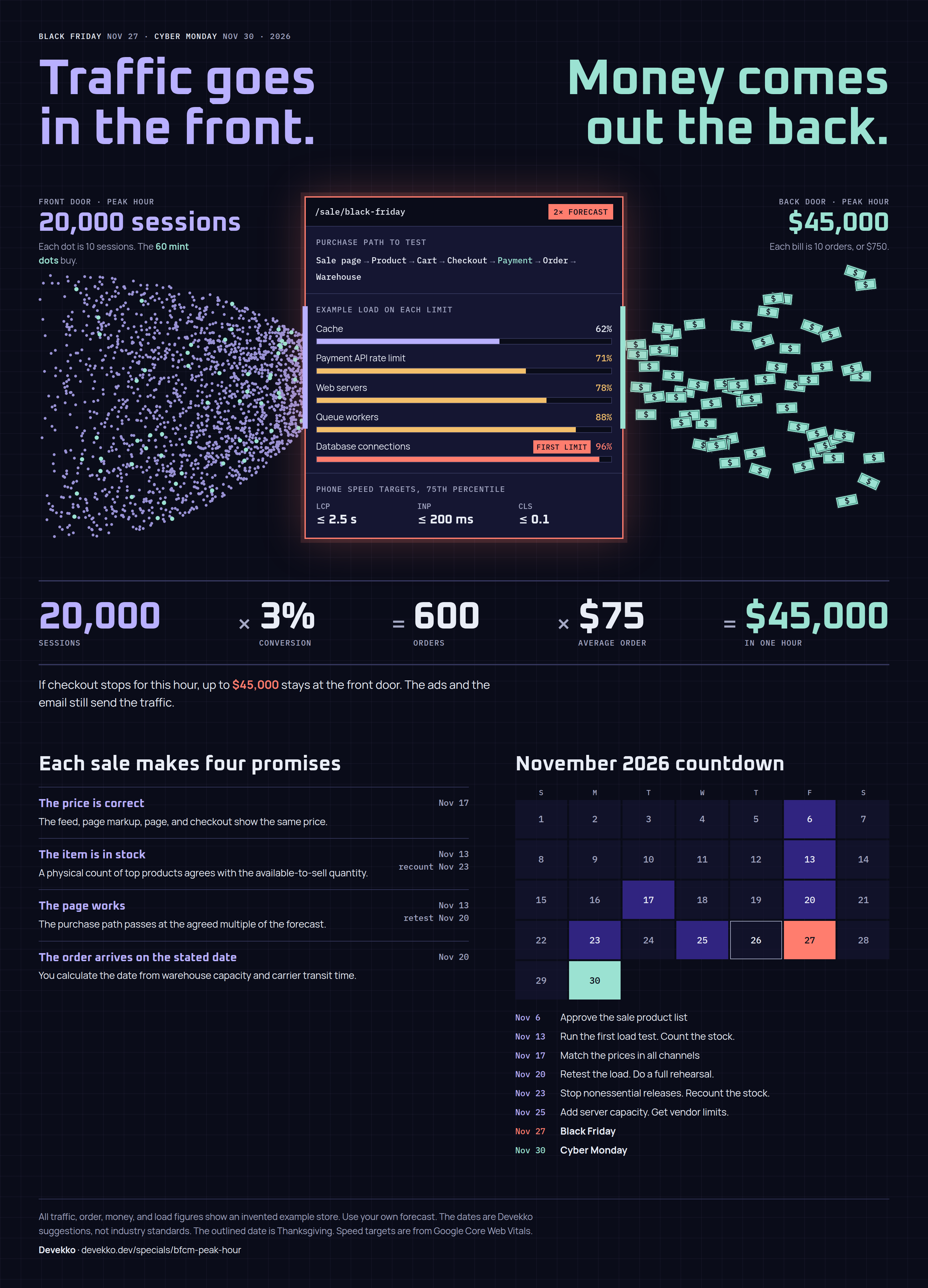
The dates assume a November 27 start. They are suggestions, so move them to fit your team and your supplier deadlines. The interactive infographic shows the four promises and these dates on one page.
| Area | Item | Evidence of readiness | Finish by |
|---|---|---|---|
| Catalog | Sale product list | Approved list with SKU, sale price, margin, and start and end times | Nov 6 |
| Catalog | Inventory reconciliation | Physical count agrees with available-to-sell quantity for top products | Nov 13, recount Nov 23 |
| Catalog | Sale images | Approved image for each sale product and each placement | Nov 13 |
| Catalog | Sale descriptions | Each description states the offer, end time, and limits | Nov 13 |
| Catalog | Sale metadata | Feed, page markup, page, and checkout show the same price | Nov 17 |
| Storefront | Product page layout for the sale | Phone test shows price, stock state, and delivery date with no layout shift | Nov 13 |
| Demand | Ads | Ads approved, and a person can stop them when stock is low | Nov 20 |
| Site | Load test | Purchase path passes at the agreed multiple of the forecast | Nov 13, retest Nov 20 |
| Site | Performance test | Sale pages meet the agreed speed targets on a phone | Nov 20 |
| Site | Server pre-scaling | Capacity increased, and vendors confirmed their limits | Nov 25 |
| Warehouse | Labor plan | Hours by day and shift agree with the forecast | Nov 13 |
| Warehouse | Warehouse staff | Names on each shift, and new staff trained | Nov 20 |
| Warehouse | Fulfillment capacity | Timed trial meets the peak-day rate | Nov 20 |
| Customer | Projected fulfillment times | Dates calculated from capacity and carrier transit time | Nov 20 |
| Customer | Customer service messages | Approved replies for the most frequent contacts | Nov 20 |
Prepare the catalog
Sale products. Approve one list. For each SKU, record the normal price, sale price, start time, end time, and available units. Calculate margin after the discount, delivery cost, and expected returns. If a product loses money, make that loss an approved decision or remove the product.
Check the normal price too. The FTC guide on former prices says a former price must be the actual price offered to the public on a regular basis. It calls a price fictitious if a seller inflates it to show a larger reduction. Keep a record of the former price, and ask your counsel about the rules in your markets.
Inventory. Count your top products physically. Compare the count with the on-hand, reserved, damaged, and available-to-sell quantities in each system. Investigate each difference before the sale, because an ad can sell stock that the warehouse does not have. Then test the zero-stock rule: sell the last unit and check how fast each channel stops the sale. The warehouse guide defines these inventory states.
Images. Make the sizes that you need for collection pages, product pages, email, and ads. Text in an image cannot change when the price changes, so put the sale price in page text where you can. If an image must show an offer, record its end date and name the person who removes it.
Descriptions. Add only what the sale changes: the offer, end time, limits, exclusions, and return terms. Schedule the return to normal text after the sale. A sale description that stays live after the sale tells customers about an offer that has ended.
Metadata. Use the same sale URL each year. Google recommends a recurring URL such as /sale/black-friday and early publication, so that search has time to find the page.
Prices need the same care in feeds and markup. Google Merchant Center requires the sale price to match the landing page and checkout. Without an effective date, it applies the sale price immediately. Google's structured data documentation warns that a listing may not display if priceValidUntil shows a past date. Compare the feed, markup, page, cart, and checkout for a sample of products.
Approve the ads and the product page
Ads. Send ads for review early. Google says that it reviews most ads within one business day, but some take longer, and a change starts a new review. Link each ad to a page that shows the same offer.
Agree a stop rule: who pauses spend on a product, and at what stock level? Give the engineers and the warehouse the start time of each large ad flight and email send. Those times tell them when the traffic peaks can occur.
Product page. Change the layout only where the sale needs it. Near the purchase button, show the normal price, sale price, end time, stock state, and delivery date. Reserve space for each item so that a late sale badge does not move the button. Use a countdown timer only if the offer ends at that time.
Test the page on a phone first. Include a long product name, a sold-out variant, and the page state after the sale ends. Decide what a customer sees when a product sells out, and link to a similar product if you have one.
Test the site at sale load
Load test. Convert the forecast into traffic. In an illustrative store, 300 orders in the peak hour at a 3% conversion rate is 10,000 sessions in that hour. A test at twice the forecast is 600 orders and 20,000 sessions. Choose your own multiple and record the reason. The interactive infographic shows this example at both loads.
Test the full path: sale page, product page, cart, checkout, test payment, order creation, and the message to the warehouse. Grafana's guide to load test types describes spike tests for seasonal events and soak tests for prolonged use. Run both, because an email send makes a spike and a holiday weekend makes a long load.
Read each vendor's rules before you test. On a hosted store, your test target can change. A Shopify article advises you to target the third-party services in your purchase path, and not the platform. Get written approval from each service that you test. Record the first component that fails and the load at which it fails, then fix it and test again.
Performance test. A load test measures the site at high traffic. A performance test measures the experience of one customer on a phone. Google's Core Web Vitals targets apply at the 75th percentile. They are LCP of 2.5 seconds or less, INP of 200 milliseconds or less, and CLS of 0.1 or less.
Test the sale pages with all the sale banners, tags, and apps active. Those additions can make a sale page slower than the normal page. Remove each tag that nobody will use for a decision.
Server pre-scaling. Automatic scaling can lag behind a sudden spike. Use the load test result to add capacity before the peak: web servers, database connections, queue workers, and cache. Then ask your payment, tax, search, email, and carrier label vendors about their rate limits and their support contacts. If your host manages the servers, apply this step to your own apps and integrations.
Write the order in which you disable features under load. Recommendations and search suggestions can stop before checkout is at risk. Stop nonessential releases from November 23, and name the person who can approve an urgent change. Schedule the capacity decrease after the sale so that the extra cost has an end date.
Staff the warehouse from the forecast
Labor plan. Calculate hours from your own measured rate. In an illustrative warehouse, a team does 30 orders per labor hour, and the forecast shows 1,800 orders on the peak day. That is 60 labor hours. At 6 productive hours in an 8-hour shift, the plan needs 10 people. New staff work more slowly at first, so use a lower rate for them.
Show hours by day and shift, and include receipts, returns, supervisors, and absence. Include the weekend and Thanksgiving, and check the local rules for overtime.
Warehouse staff. Confirm names for each shift, because a headcount does not show who has agreed to work. Train new staff with real scans, and include a wrong item and a damaged label. Give each person a login and a scanner before the first shift. Train each person on the safety rules for the site.
Fulfillment capacity. Run a timed trial at the peak-day rate. Measure pick, pack, label, and carrier handover. Find the first limit: pack stations, printers, boxes, label stock, dock space, or carrier collection. Ask each carrier for written confirmation of extra collections.
Ask each carrier about peak charges too. For example, FedEx lists higher demand surcharges from November 23 to December 27. Add the charges that apply to your account to the margin calculation.
Publish delivery dates that you can keep
Projected fulfillment times. Calculate the date from the backlog and the carrier transit time. Use the illustrative warehouse again, with 7 people instead of 10. That team does 1,260 orders per day, while 1,800 orders arrive. The backlog increases by 540 orders per day and reaches 2,160 after four days. The team needs at least two more work days to clear it.
Show the calculated date on the product page, cart, and confirmation email. Name one person who updates the date when the backlog passes an agreed level. For orders that customers need by December 25, use the USPS recommended dates and your carrier's dates. In the Lower 48, USPS lists December 17 for Ground Advantage, December 18 for Priority Mail, and December 19 for Priority Mail Express.
US sellers must also follow the FTC rule on mail and internet orders. You need a reasonable basis for the time that you state, or for 30 days if you state no time. If you cannot ship on time, get the customer's consent to the delay, or cancel the order and give a refund.
Customer service messages. Write replies before the sale for the most frequent contacts. Include order status, a late delivery, a failed discount code, a product sold out after purchase, an order change, and a return. Each reply states what happened, what happens next, the date, and what the customer can do.
Prepare the delay notice now. The FTC guide says it must give a revised ship date, or state that you cannot give one. It must also offer cancellation with a full refund, and give a no-cost way to cancel. Ask your counsel to review the text.
Tell agents which refunds, credits, and replacements they can approve alone. Give them one live source for the backlog, delayed products, and known site problems. Test each automatic email with a real test order, and schedule enough agents for the weekend.
Rehearse, then record the result
Do a full rehearsal by November 20. Follow one test order from the ad to the carrier handover and then to a customer service reply. Each failure goes on a list with one owner and one date. For the sale weekend, name one person for each area and one person who can stop a promotion.
During the sale, compare actual orders with the forecast each hour. In the week after the sale, record orders, errors, late shipments, and contact reasons. That record becomes the start of next year's forecast.
The ecommerce integration guide gives more detail on the handoffs between the store, warehouse, and finance systems. Devekko's ecommerce development service covers storefront and connected-system work.
Your next step
Discuss your BFCM plan
Share the task, your current systems, and the decision you need to make. We’ll discuss a useful first scope.
Discuss your BFCM plan